
Research Experimental
Samsara-VLA
Robot control with memory.
Two compact robot policies for language-conditioned manipulation. Watch them pick, place, open and complete multi-step tasks.
From instruction to completion
Samsara-VLA above. Samsara-VLA Tiny below. Every category stays in view.
Spatial
Find the object described by its position.
Samsara-VLA
“Pick up the black bowl between the plate and the ramekin and place it on the plate”
Samsara-VLA Tiny
“Pick up the black bowl between the plate and the ramekin and place it on the plate”
Object
Select the named object among distractors.
Samsara-VLA
“Pick up the cream cheese and place it in the basket”
Samsara-VLA Tiny
“Pick up the cream cheese and place it in the basket”
Goal
Change the scene to match the instruction.
Samsara-VLA
“Open the middle drawer of the cabinet”
Samsara-VLA Tiny
“Open the middle drawer of the cabinet”
Long
Carry out an instruction with several actions.
Samsara-VLA
“Put both the alphabet soup and the cream cheese box in the basket”
Samsara-VLA Tiny
“Put both the alphabet soup and the cream cheese box in the basket”
Two models, one interface
Samsara-VLA turns camera images, an English instruction and robot state into continuous control. It carries a compact memory between observations and predicts twelve actions at a time. Samsara-VLA Tiny uses the same interface with a smaller visual encoder.
Full model
Samsara-VLA
- Native LIBERO success
- 94.50%
- Parameters
- 217.43M
1,890 / 2,000 successful episodes
Compact model
Samsara-VLA Tiny
- Native LIBERO success
- 89.30%
- Parameters
- 136.52M
1,786 / 2,000 successful episodes
Tiny uses 37.2% fewer parameters, with a 5.2-point difference in overall success. Both counts include the frozen text encoder. Both models trained for 40,000 updates and 5.12 million supervised sample presentations.
Native LIBERO results
We evaluated each released checkpoint on 40 tasks and 2,000 episodes. Every task uses fifty official initial states. Object selection is the strongest suite for both models; longer sequences show the largest difference between them.
Spatial
Object
Goal
Long
The full model completes 449 of 500 Long episodes; Tiny completes 380. On Object, they complete 497 and 491 respectively. These counts make the size–capability tradeoff more useful than a single overall score.
This is a self-reported, single-seed simulation evaluation on trained task templates, not an independent holdout. Physical robots and unseen tasks have not been validated.
Model size and capability
A compact policy makes local deployment easier to explore. The table places our two released models alongside published LIBERO results, with model size shown for every row. It does not establish a latency or memory-use ranking.
| Model | Parameters | Overall success |
|---|---|---|
| Samsara-VLAOne policy · 50 trials per task · our evaluation | 217.43M | 94.50% |
| Samsara-VLA TinyOne policy · 50 trials per task · our evaluation | 136.52M | 89.30% |
| OpenVLA-OFT · unified 2 views + state · one policy · published | 7B base | 96.8% |
| π₀ 2 views + state · published | 3.3B | 94.2% |
| SmolVLA · 450M Multi-task · 10 trials/task · replan each action | 450M | 87.3% |
| OpenVLA 1 view · published | 7B | 76.5% |
Published references, not matched reruns. Camera inputs, training data, policy sharing and trial counts differ. Parameter counts include frozen components for Samsara; reference sizes follow the cited papers.
How the policy acts
The instruction identifies what to do; the camera views show the current scene. Memory carries context into the next decision. Fresh visual features and that history jointly inform the next action sequence.
Samsara-VLA / Observe, remember, act
Current vision, persistent history.
01 / Observe
Read the scene from two views.
The scene camera locates the cabinet. The wrist camera shows the view from the gripper. Both 256 × 256 images and the instruction enter the policy at each replan.
“Open the middle drawer of the cabinet.”
Scene cameraWrist camera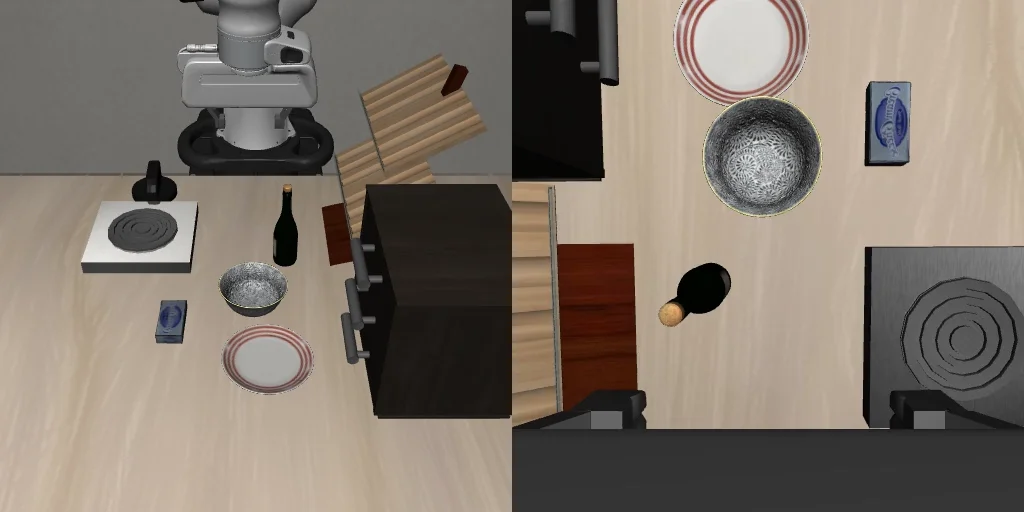 Camera views + instruction + robot state
↻ Observe again. Keep history until the episode ends.
Scene and wrist views from the same recorded episode. 02 / Remember
Update history without losing spatial detail.
Two recurrent blocks summarize earlier observations and robot state. One history token reaches the action decoder alongside the current image features, which retain their spatial detail.
“Open the middle drawer of the cabinet.”
Earlier observations
Compact recurrent state
Current camera views + memoryContext for the next decision
↻ Observe again. Keep history until the episode ends.
A schematic of retained context, not a visualization of learned memory values. 03 / Act
Predict a short sequence of actions.
The decoder predicts twelve actions, each with seven control values for position, rotation and the gripper. The controller executes the chunk before asking the policy for another one.
“Open the middle drawer of the cabinet.”
One prediction / Twelve actions
010203040506070809101112PositionRotationGripperAction structure shown schematically. Each column is one control step.
↻ Observe again. Keep history until the episode ends.
Twelve actions, each with seven control values. The diagram shows the output structure. 04 / Repeat
Observe again, with history intact.
New camera images update the current view. The history cache keeps the same shape as the episode grows and resets at the next episode. Its effect on success still needs a matched ablation.
“Open the middle drawer of the cabinet.”
Scene cameraWrist camera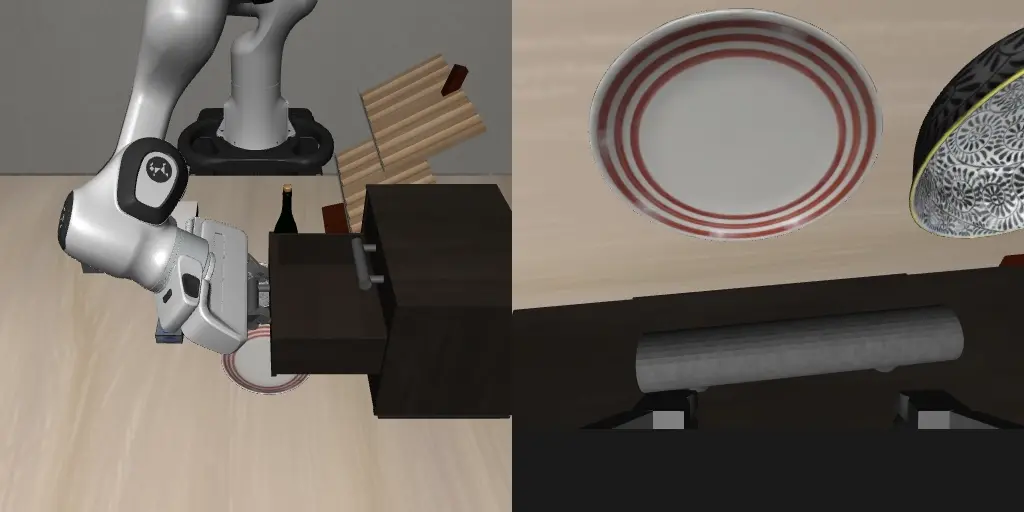 Fresh observations + retained history
↻ Observe again. Keep history until the episode ends.
The drawer task completes in this recorded example. The policy resets its history for the next episode.
Camera frames come from the released model’s drawer episode. Memory and action diagrams show the interface; they do not measure a causal benefit from memory.
Runs on your device
The same policy can run through the Python SDK on CPU or CUDA, or through ONNX in a browser. Browser execution uses WebGPU when available and WebAssembly CPU otherwise. After the model loads, inference runs locally without a prediction service.
The browser preview is a separate demonstration from the native benchmark. In fixed-scene CPU checks, the full model completed both the bowl and drawer tasks; Tiny completed the bowl task and reached the time limit on the drawer. These checks are not browser success-rate or latency measurements.
Models and the browser preview currently require research access. EUPE-derived weights retain the FAIR Noncommercial Research License. The full model card covers the protocol, architecture and deployment requirements.
Research access
Work with Samsara.
Contact us for model access, the browser preview or a research collaboration.