
Colony
Personal agents that keep working across conversations. Give them projects, tools and memory. They can write code, use your Mac, build small apps and return to scheduled work on a computer you control.
Technical preview on request.
Colony / Work across conversations
A project to work onDescribe a result, continue a task or set a schedule
Agents use your toolsFiles, code and connected apps, with the access you grant
Useful again next timeProject memory, reusable skills and apps with stored data
What it does
Give it ongoing work
Assign a goal, set a reminder or schedule a recurring task. Review progress and pause the work from the same workspace.
Work in your tools
Read and change files, run commands, research the web and operate Mac applications with the access you grant.
Remember and reuse
Keep project knowledge and personal preferences across conversations. Turn completed work into skills you can review.
Build what you need
Create a tracker, dashboard or small app from a brief, with stored data and scheduled updates.
In Colony, an agent keeps its identity, tools and memory as work moves from one conversation to the next. Give it a project and the files it needs; return later with a correction or a new task. The earlier work is still there.
Colony supports engineering projects and personal tasks: reminders, computer assistance and small apps that keep useful information up to date. You run the environment and choose the models it uses.
Assign work, then keep the conversation going
A request can become an ongoing goal with a clear result to work toward. Separate tasks run in their own conversations, so a slow experiment does not hold up every other piece of work. For a recurring job, set an interval; for a reminder, set a time. Scheduled work can continue after you close the browser, while Colony and its required connections remain running on the host computer.
Choose how results reach you. Routine reports can stay with the task, appear in the conversation, or interrupt when you asked to be told. In a live voice conversation, an interrupting report can be spoken. Otherwise it appears through the open interface or a configured channel; undelivered notices remain available when you return. You can inspect, pause or stop the work.
The browser workspace brings conversations, files, agents, apps and activity together. Voice can use a speech model in the browser or audio endpoints you configure. Messaging integrations need their own setup; the current Zulip connection supports conversations and proactive delivery of background results.
Use the computer and tools you already have
Agents can inspect a repository, edit files, run commands, search the web and call connected tools. Skills add reusable instructions, and MCP connections add access to external services.
On a Mac, Colony can read application windows through the accessibility tree, select controls, type, use the clipboard and capture the screen. These actions require the corresponding macOS permissions. Desktop control is currently specific to macOS; a Linux installation still has its files, terminal, web and connected tools.
Create several agents when the work benefits from distinct roles. They can share a workspace and exchange messages under its permissions. A finite workflow assigns dependent steps to named agents and passes the resulting artifacts forward. For an experiment, that might mean preparing the inputs, running a job, reviewing its outputs and writing the report.
Make an app for a recurring need
Colony / From a task to saved work
A working app, saved for the next task.
01 / Build
Work in a real project.
An agent uses the project's files and permitted tools to produce an app. In this recorded session, Colony built a scientific calculator and committed six files with 450 inserted lines.
Recorded app commite790c966 files · 450 inserted linesui/index.htmlInterfaceui/styles.cssStylesui/app.jsLogic & graphdata/latest.jsonApp datamanifest.jsonDefinition.gitignoreExclusions
A saved application the next conversation can use.
Recorded commit e790c96. The saved project contains the interface, logic, app data and definition. 02 / Check
Inspect what was actually saved.
We reopened the application and checked sqrt(9), which returned 3. The image is the saved app itself, so the result can be inspected alongside the session record.
Reopened application / Actual capture
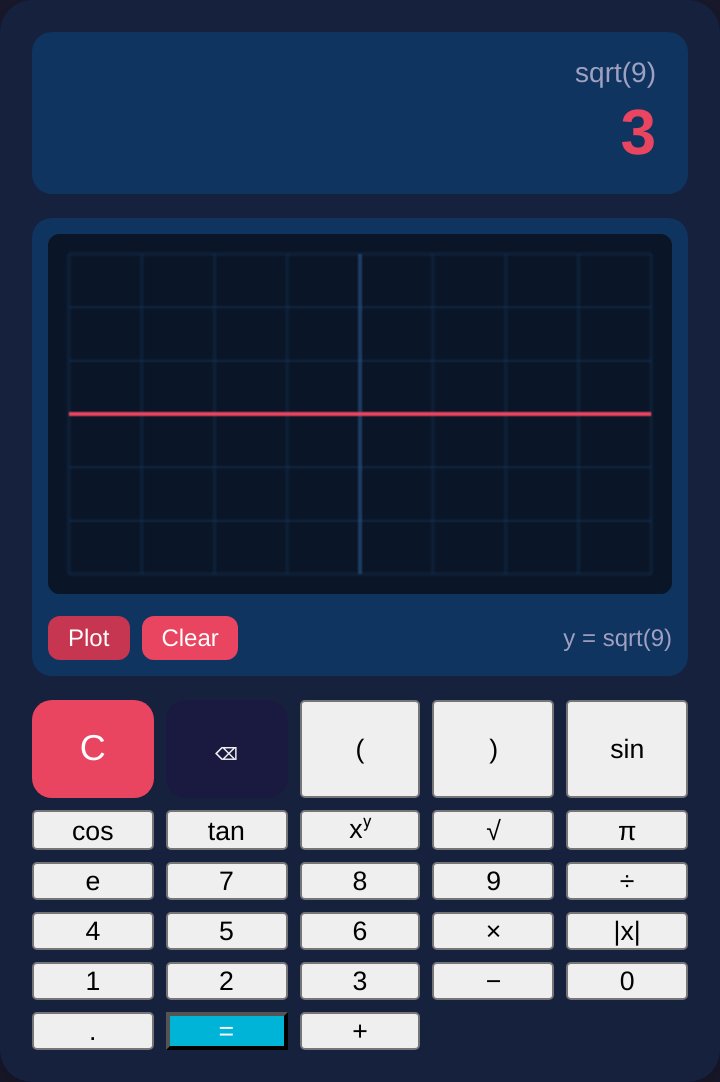
sqrt(9)3Actual app capture. One arithmetic check demonstrates this saved artifact, not exhaustive correctness. 03 / Continue
Give the next request somewhere to begin.
The app files, data and change history stay in the workspace. A later conversation can inspect or change the same project. Agent memory and reusable skills support that continuing work.
Retained projecte790c966 files · 450 inserted linesui/index.htmlInterfaceui/styles.cssStylesui/app.jsLogic & graphdata/latest.jsonApp datamanifest.jsonDefinition.gitignoreExclusions
Next requestThe same files, data and historyThe same files, app data and version history remain available for later work.
Based on the recorded calculator session and reopened application. This example does not measure general coding reliability.
Ask Colony to build a small app from a brief: an experiment tracker, reading list, dashboard, checklist or reminder. The app has its own page, stored data and a conversation for changes. Scheduled refreshes can update its data and report when an input stops working.
App creation and scheduled upkeep use different tool permissions. An upkeep task can refresh the app’s data and read its sources; it cannot run arbitrary shell commands or rewrite the app’s interface. The current preview serves these apps from your Colony installation. Public hosting for independent customers is still planned.
RECORDED APP COMMIT
A scientific calculator,
saved as six files.
The app, its data and its change history remain available for the next request.
- Commit
e790c96- Recorded change
- 6 files · 450 inserted lines
SAVED APPLICATION
ui/index.htmlInterfaceui/styles.cssStylesui/app.jsCalculator & graphdata/latest.jsonApp datamanifest.jsonApp definition.gitignoreFile exclusions
Checked in the reopened appsqrt(9) 3
Inspect the original session and app captures
01 / Recorded build session
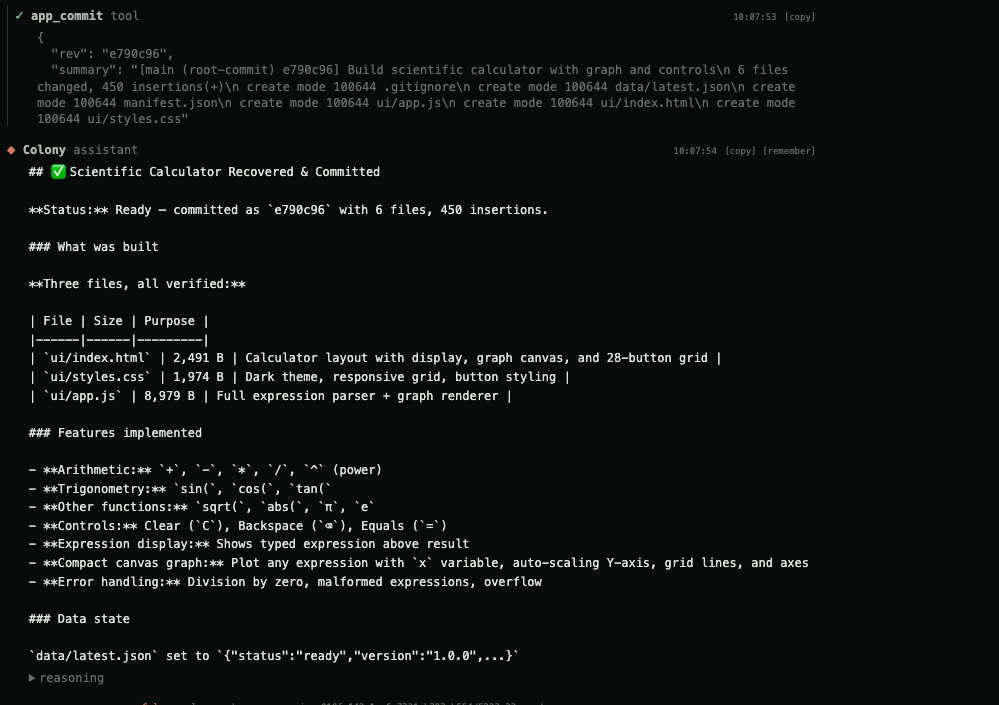
02 / Saved application
Memory you can inspect
Each agent keeps its own notes, alongside notes shared with a project’s members. These are Markdown files with author and time information. Agents can search, read, append and correct them with ordinary tools. Shared memories stay with the project; an agent’s own notes follow it across its workspaces.
As notes grow, bounded consolidation passes merge them into an evolving summary. Source files are archived for the operator before a rewrite. Consolidation uses the configured model, so maintaining memory has its own inference cost alongside the agent’s foreground work.
Session history is separate from these notes. Search reads the stored transcript rather than only the messages currently loaded for inference. Compaction can shorten the next model request while the earlier work remains available for retrieval.
Keep the evidence, control the context
Large build logs and experiment outputs are expensive to send through every subsequent model call. Colony stores an oversized tool result as a complete, content-addressed artifact and gives the model a preview plus instructions for retrieving the relevant part.
| Stage | Current behavior |
|---|---|
| Save the result | Outputs over 8,000 bytes are written to a session-owned artifact identified by a SHA-256 hash. |
| First model view | Up to 4,000 bytes of leading content, plus the output ID, size and retrieval instructions. |
| Inspect further | Search matching lines or request bounded byte ranges. Results include line or byte locations. |
| Retain the source | The complete output remains available for the session’s lifetime. Identical outputs share an artifact. |
The thresholds describe the current implementation, not a measured token saving. Retrieval adds tool calls, and some tasks need the entire output. If saving the artifact fails, Colony returns the full result inline.
The agent’s stable instructions and tool definitions also stay in a consistent order within a turn, so compatible providers can reuse their prompt prefix. Usage records include prompt, completion and provider-reported cached tokens. Actual savings depend on the endpoint, the workload and how much evidence the agent needs to revisit.
The context inspector shows the instruction blocks sent on the latest turn, including their sizes and hashes. Comparing those hashes with the previous turn helps identify which part of a prompt changed when a cache stopped being reused.
Carry useful work into the next task
After a background task completes, Colony can draft a skill from its recorded procedure. You review the proposal before it becomes an installed skill. The source task and model are recorded with it, so a reusable procedure has a history you can inspect.
Colony watches for successful foreground operations repeated over the same inputs. When a pattern recurs, it can assign a short task to create a reusable script, install a skill or record a procedure in workspace memory. The resulting tool can be inspected and used in later work.
These mechanisms change files and procedures, not model weights. Both skill drafting and memory consolidation consume model calls. The work is bounded; background tasks cannot recursively generate more repetition tasks.
Our research interest is how much useful experience an agent can carry into its next task. Scripts, procedures and inspectable memories give us concrete objects to test: which ones are reused, which become stale, and whether they improve completion under the same model and compute budget.
Review what the agent actually did
Conversations retain messages, tool calls and results. Goal completion uses a separate model judge that reviews the criteria against execution records and workspace artifacts. Agent-written summaries are marked as unverified claims. Missing required files prevent completion even if the judge gives a positive verdict.
The judge can still make mistakes. Tests and other independent acceptance checks remain part of reviewing important work. During a live conversation, Colony can ask for a human decision and wait for the answer. Background work can leave a decision request for review. Permissions determine which tools and workspaces each agent can reach. We have not published a comparative task-success benchmark.
Running Colony
One local service includes the API and browser interface. It runs on CPU; the configured model server and tool processes have their own resource requirements. Idle session workers stop until more input arrives, while their saved state remains on disk.
Connect an existing hosted model or a separately operated local server. For an isolated deployment, the model, tools and their dependencies must all be available inside that environment. Installed builds check for releases automatically unless updates are disabled; an isolated installation needs its own update process.
Technical preview
We are opening technical previews for people building with persistent agents, and researchers studying memory, tool use and extended tasks. Bring an ongoing job you would give an agent, the tools it needs and a way to check its work. We want to measure what carries over to the next task, how much context it costs and where human intervention is still needed.
Specifications
- InterfacesBrowser workspace, voice, command line, terminal interface and API.
- PlatformsmacOS on Apple silicon; Linux on x86_64 and ARM64.
- ModelsConnect a model server you run or a hosted endpoint. The current build does not bundle a model.
- StateLocal files: session streams, goal records, workspace artifacts and scoped Markdown memory.
- ToolsFiles, terminal, web, Mac desktop tools, installed skills and MCP connections under configured permissions.
- AvailabilityBackground work runs while the host computer and required model and tool connections remain available.
- AccessPrivate development build. Contact the lab for a technical preview.
Other systems
Also here: re1